




What is the Insights Dashboard?
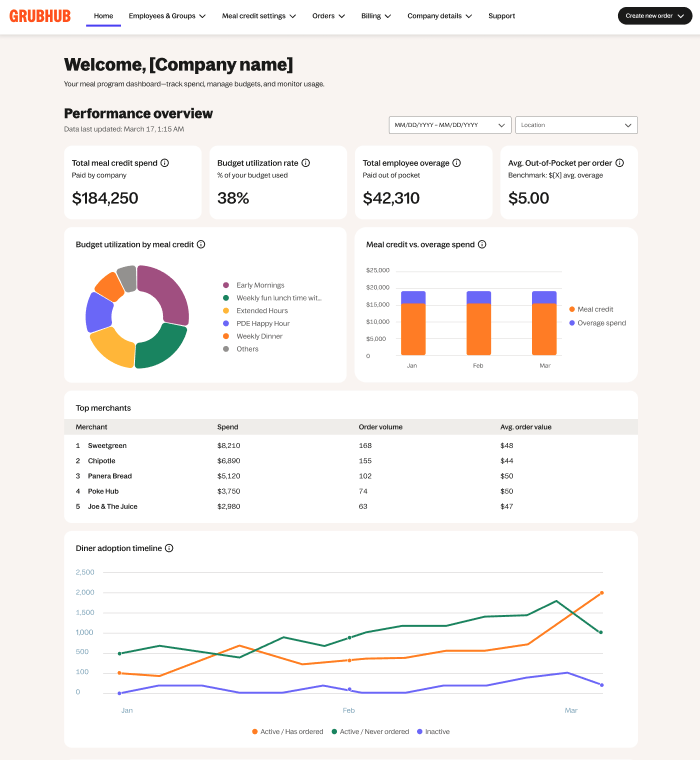
The Insights Dashboard is an on-demand tool that provides real-time account insights so you can effortlessly optimize your meal program. To access it, log into your portal and find it directly on the homepage.
How can it help me?
Streamline workflows and save time: Eliminate manual reporting with automated homepage overviews that simplify tracking.
Maximize budgets and employee engagement: Catch spending gaps to optimize your meal program and drive adoption.
Easily prove your program ROI: Access presentation-ready performance metrics and confidently share budget decisions.
How do I access it?
Simply log into your portal to access the Insights Dashboard on your homepage.
Getting to know the Insights Dashboard
Learn about each feature directly in the dashboard by selecting  .
.
Filters: enable time and location-based views of program data
Total meal credit spend: the total amount of meal credits spent by employees, excluding any taxes, tips or out-of-pocket overages
Budget utilization rate: the percentage of total allocated corporate budget spent by employees
Total employee overage: the total out-of-pocket difference paid by employees when their meal total exceeds their daily allowance
Avg. Out-of-Pocket per order: the average out-of-pocket difference paid by employees when their meal total exceeds their daily allowance
Budget utilization by meal credit: a breakdown of how your total budget is being spent across each active meal credit
Meal credit vs. overage spend: a comparison that shows how your meal credits and any overages change over time
Diner adoption timeline: displays how employees are using their meal credits to find trends and re-engagement opportunities
Using the Insights Dashboard
How to track total meal credit spend
Your dashboard displays your organization's real-time Total meal credit spend and Budget utilization rate. Review these metrics weekly to monitor volume trends and track spending parameters.
How to catch spending gaps and overages
View the visual graph comparisons to quickly and easily identify underutilized balances and evaluate employee adoption over time.
How to review merchant performance metrics
The Top merchants list populates your organization's highest-volume accounts categorized by order volume and average order values. Use this chart to evaluate where team funds are distributed and track localized catering alignment.
How to leverage data for presentations
The Insights Dashboard consolidates all transaction variables into an exportable, presentation-ready performance metric summary. This automated data allows you to confidently communicate budget decisions and program ROI to company leadership.
Need assistance?
Your portal homepage includes contact information for our Business Account Support Team (844-478-2249, option 3).